Mental model of NONMEM runs
In this part we go through NONMEM's data and model specification and outputs. We use the syntax of NM-TRAN (NONMEM TRANslator), a standalone component of NONMEM for input parsing that is essentially used in all modern models. However, before that we would like to present a mental model to help user understand how NONMEM processes input.
NONMEM treats input as a series of events. User can specify events through a data file or in the model. NONMEM processes these events one after another, in the order of the event time. After finishing one subject's events, it moves to next subject and repeat 1.
By "processing", we mean that NONMEM calls an internal program PRED, or
its specialized (for popPK models) version PK and ERROR. These
programs assemble subject-level and observation-level information
and move the system from one event to next. They are called on every
subject, one event after another. This is often referred in documentation as "PK
call" or "PRED call".
When the subject-level and observation-level information changes, the
above event-by-event calls will be repeated. This is typical during
parameter estimation: when population parameters are
be updated, NONMEM processes the events over and over,
until the termination of the estimation. Therefore during a run
NONMEM often calls PRED (or PK & ERROR) many times.
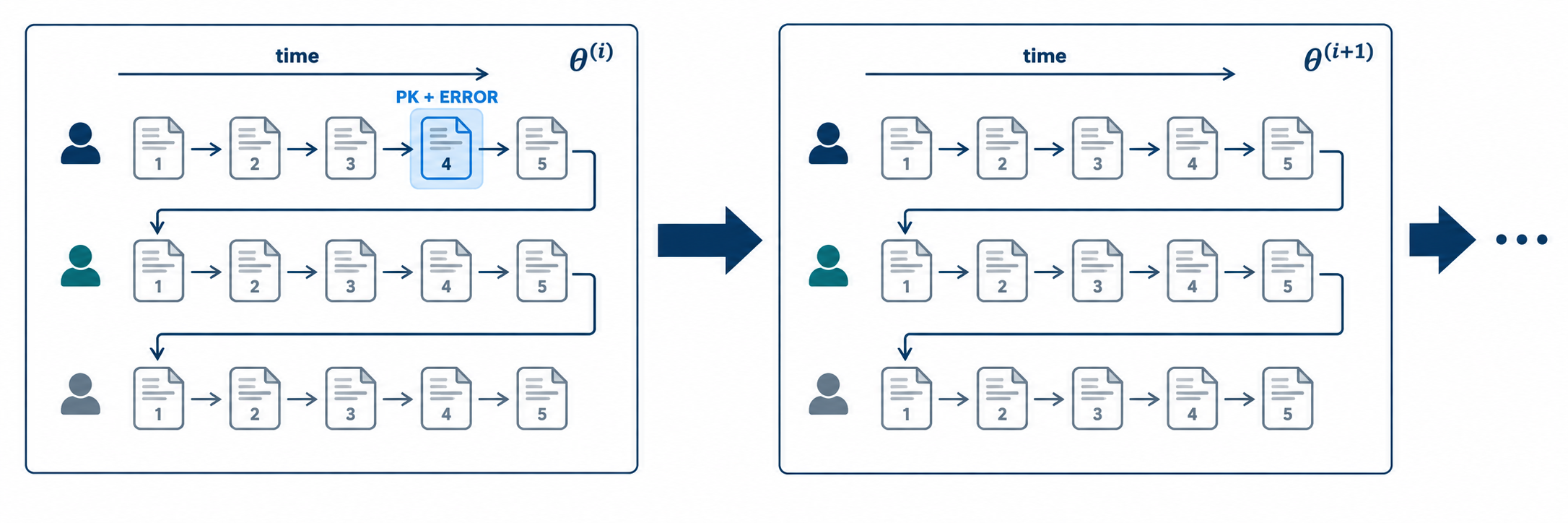
PK and ERROR. The process is repeated during parameter estimation, symbolized here as the population parameter θ is updated through estimation iterations. At the moment NONMEM is processing event 4 of the first subject, during estimation iteration i.
Data and model
NM-TRAN takes its input from two files:
- NM-TRAN control stream,
- NM-TRAN data set.
and creates three things: a NONMEM data set, a NONMEM control stream 2, and necessary subroutines. For example, it uses the data file input and creates NONMEM data file FDATA 3. The table below lists some files that NM-TRNA generates.
| FILE | Content | Usage |
|---|---|---|
| FDATA | NONMEM data set | NONMEM input |
| FCON | NONMEM control stream | NONMEM input |
| FSUBS | generated and user subroutines | build executible |
| FSTREAM | NONMEM file stream | NONMEM input |
| FREPORT | report file | Informational |
See Reference manual for additional files and details.
Usinig the files created by NM-TRAN, NONMEM fits the model and generates a number of output files.
If an Model Specification File (MSF) is output, and intermediate output with iteration summaries
is requested (i.e., $ESTIM options MSFI and PRINT are used), then
NONMEM also writes the parameter estimates of these summaries to
the console and to file INTER, which now exists after the run
terminates. INTER now include lines giving the parameter estimates
in their natural unscaled space (NPARAMETR) as well as the UCP
values (PARAMETER).
NM-TRAN also supports NONMEM's pre-built population PK models (PREDPP) by generating its subroutines. It also handles additional model inputs such mixture models (MIX) and Bayesian inference (PRIOR and BAYES). We will cover PREDPP in the next part.
NONMEM allows customization of event processing: user can choose to skip events or treat events differently. This does not broadly change the mental picture we are describing.
Before NM-TRAN was developed NONMEM requires input files in a less intuitive fashion. These files consist "NONMEM control stream". Nowadays almost all NONMEM models are based on input files using NM-TRAN. Therefore in this document unless specified we use "NM-TRAN control stream" and "NONMEM control stream" interchangeably, to mean input files based on NM-TRAN syntax. See next section and Reference manual for details of the old NONMEM control input files.
With NONMEM 7.5, an additional file, FDATA.csv is produced that outputs the contents of its input data file (typically FDATA) in a comma delimited file format, so you can check how NONMEM interprets the input data. The records in FDATA.csv may differ from those in FDATA in the following cases. If REPL/REPL_ is used, the replicated form of the data will appear in FDATA.csv.